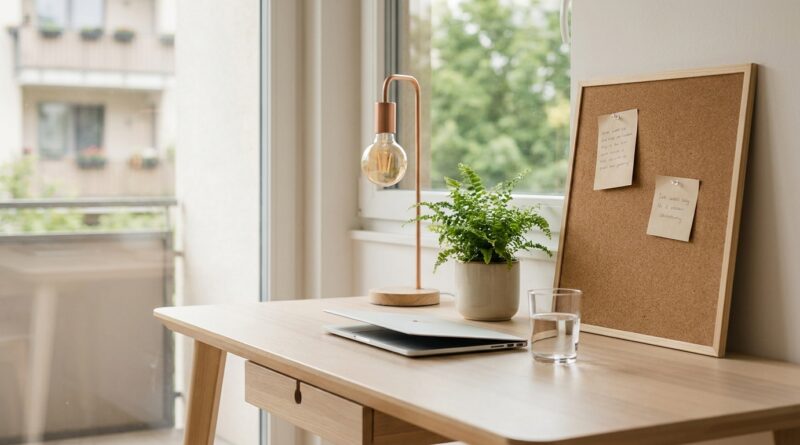
The 5‑Pillar Biophilic Desk: A Minimalist Way To Turn One Tiny Space Into A Focus Machine
You can spend weeks fixing your calendar, muting notifications, and trying new productivity tricks, then sit down at your desk and still feel oddly tense. That feeling is real. A workspace can quietly drain you even when your task list is perfectly organized. If your desk feels cramped, harsh, cluttered, or flat, your brain notices.
A biophilic minimalist workspace is a simple way to fix that. It means shaping your desk so it feels calm, natural, and easy to think in, without turning it into a jungle or buying a cart full of gear. Research on biophilic design keeps pointing to the same idea: small doses of nature help lower stress, improve attention, and make work feel less mentally noisy. The good news is you do not need a remodel. You need a better mix of light, texture, air, order, and one or two natural cues. Think of it as a five-pillar reset for one tiny patch of your day.
⚡ In a Hurry? Key Takeaways
- A biophilic minimalist workspace uses five simple elements, light, greenery, natural texture, breathing room, and gentle sensory control, to make a small desk feel calmer and more focused.
- Start with what you already have. Move the desk toward daylight, remove visual clutter, add one plant or natural object, and keep only your daily tools in reach.
- You do not need expensive furniture or lots of plants. Even modest nature cues can help reduce stress and improve attention in small home offices and shared work areas.
Why your desk feels tiring even when it looks “fine”
Most people blame themselves first. They assume they lack discipline, they need a better app, or they just are not trying hard enough. But plenty of focus problems start in the room, not in your character.
A desk can create low-grade friction all day long. Glare makes your eyes work harder. Random objects pull your attention sideways. Flat artificial light makes the whole area feel dull. No softness, no life, no visual rest. It adds up.
That is where the idea of a biophilic minimalist workspace helps. You are not decorating for Instagram. You are reducing mental drag.
The 5-pillar biophilic desk
If you only remember one thing, remember this. Your desk does not need more stuff. It needs better signals. These five pillars give your brain clearer, calmer input while keeping the setup simple.
1. Light that feels human
Start with the light. It is the fastest win.
If possible, place your desk near natural daylight, but not in direct glare. Side light is usually best. A window directly behind your monitor can wash out the screen. A window directly in front can strain your eyes. Off to the side is the sweet spot.
If daylight is limited, use one warm, diffused desk lamp instead of relying only on harsh overhead lighting. You want the space to feel awake, not clinical.
Quick fix: In the next ten minutes, turn off any light you hate, clean your screen, and test a new desk angle near the window.
2. One living element, not ten
This is where people overdo it. You do not need a mini greenhouse.
One small plant is enough to change the feel of a desk. A pothos, snake plant, ZZ plant, or peace lily works for most people because they are forgiving. If you know you forget to water plants, use a clipping in water or even a small bowl of moss. If real plants are a no-go, a natural object like a stone, branch, shell, or wooden tray still helps.
The point is not botany. The point is giving your eyes somewhere soft and non-digital to land.
Quick fix: Add one plant or one natural object within your line of sight, but keep it off the main work zone.
3. Natural texture you can see or touch
Plastic-on-plastic-on-plastic makes a workspace feel cold fast. A biophilic minimalist workspace works better when at least one or two visible surfaces have a natural feel.
This could be a wood desk, a cork mat, a linen coaster, a ceramic mug, a leather notebook, or a simple cotton desk pad. Tiny changes matter because they break up the hard, synthetic sameness of most work setups.
You do not need a total furniture swap. Just swap one surface or one object your hands touch every day.
Quick fix: Replace one shiny or synthetic desk accessory with something wood, cork, ceramic, cotton, or stone.
4. Breathing room on the desktop
Minimalism matters here, but not for style points. It matters because visual clutter acts like open browser tabs for your eyes.
Keep only the items you use daily within arm’s reach. Usually that means your monitor, keyboard, mouse, notebook, water, lamp, and one natural element. Everything else should move to a drawer, shelf, tray, or box.
A good rule is this: if an item does not support today’s work, it should not live in the prime desk zone.
Leave at least 30 percent of the desk surface empty if you can. That blank space is not wasted. It is what makes the desk feel usable.
Quick fix: Remove five objects from the desktop right now. Be ruthless.
5. Gentle control of sound, scent, and air
The final pillar is sensory noise. This is the one people miss.
If your space feels irritating, it may be because your ears, nose, or body never get a break. Try one low-effort adjustment. Crack a window. Use a quiet fan. Add soft background sound like rain or light instrumental music. If scent helps you, keep it subtle. A strong candle or diffuser can become its own distraction fast.
Air flow matters more than most people think. Stale air makes a small workspace feel sleepy and boxed in.
Quick fix: Improve one thing only. Better air, softer sound, or less harsh smell.
How to build this setup in under an hour
Here is the zero-fluff version.
Minute 1 to 10: Clear the visual noise
Take everything off the desk except your core work tools. Wipe the surface. Clean the screen. Coil or hide any obvious cable mess. The goal is not perfection. It is relief.
Minute 10 to 20: Fix the light
Shift the desk or monitor to reduce glare. Open the blinds. Add a softer lamp if needed. Sit down and check how the screen looks from your usual position.
Minute 20 to 30: Add one living or natural element
Place a small plant, branch, stone, or wooden tray where you can see it without it blocking your work. Keep it simple.
Minute 30 to 40: Add one useful texture
Bring in a cork mat, ceramic mug, cloth pad, or notebook with a natural finish. You want one tactile cue that makes the desk feel less machine-only.
Minute 40 to 60: Tune the sensory layer
Test airflow. Adjust sound. Remove any irritating smell. Then sit at the desk for five quiet minutes and notice what still feels off. Usually one more small move does it.
What this looks like in a very small space
If your workspace is a corner of the bedroom, the end of a kitchen table, or a slim wall desk, this method still works.
Use vertical space instead of surface space. Put the plant on a small shelf. Clip a light to the side. Use one tray to hold your loose items. Choose slim objects instead of bulky decor. Keep the color mix calm and limited.
In tiny areas, every object has to earn its spot. That is actually an advantage. It forces clarity.
Common mistakes people make
Buying too much at once
The fastest way to ruin a minimalist setup is panic-shopping. Start with rearranging, not purchasing.
Adding plants you will not maintain
Dead plants do not feel calming. Choose easy options or use natural objects instead.
Confusing empty with functional
A bare desk is not automatically a better desk. The goal is supportive, not sterile.
Ignoring glare and posture
No amount of greenery can fix bad screen placement. Comfort still matters.
Who benefits most from this approach
This setup is especially useful if you work on screens for long stretches, struggle to start work, feel mentally crowded, or work in a space that does double duty as a bedroom or living area.
It is also good for people who hate complicated routines. A biophilic minimalist workspace is not another system to manage. Once it is set up, it quietly does its job in the background.
At a Glance: Comparison
| Feature/Aspect | Details | Verdict |
|---|---|---|
| Cost | Usually low. Most changes come from moving, removing, and reusing what you already own. | High value for very little money |
| Time to set up | About 30 to 60 minutes for a basic reset of light, clutter, texture, and one natural element. | Easy weekend or lunch-break project |
| Impact on focus | Can reduce visual stress, improve comfort, and make work feel less draining, especially in small screen-heavy spaces. | Worth trying before buying more productivity tools |
Conclusion
You do not need a full office makeover to feel better at your desk. You need a few smarter signals. Research on biophilic design shows that even modest doses of nature in your immediate environment can lower stress, sharpen attention, and improve perceived productivity, especially in screen-heavy open offices and home work nooks. That is why this five-pillar approach works so well. It is small, practical, and repeatable. Build it in under an hour with what you already have, and your workspace can start helping instead of quietly wearing you down. No new app. No expensive reset. Just a calmer little corner that makes it easier to do good work.