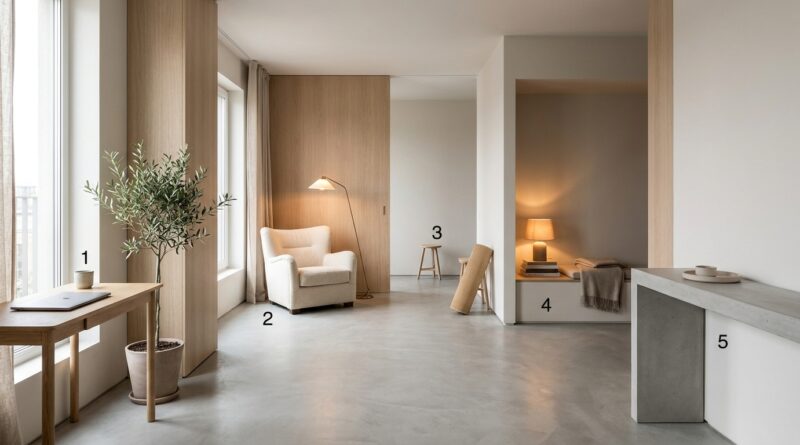
The 5-Pillar Micro‑Zone Home Setup: A Minimalist Way To Turn Every Room Into A Quiet Productivity Anchor
You are not lazy. Your house is confusing your brain. One hour you are answering email on the couch. The next you are half-working at the kitchen table. Later you bring your laptop into bed “just for 10 minutes,” and somehow both work and rest feel worse. That blurred feeling is real. When every room is trying to do every job, your mind never gets a clean signal about what mode it should be in. That is why focus feels slippery, and downtime does not feel like real downtime either.
The fix is not a new productivity app. It is a better physical script for your day. A simple system of minimalist home productivity zones can turn even a small apartment into a set of quiet cues that help you focus, think, recover, and switch off. You do not need a home office or expensive furniture. You need five small micro-zones, each with one clear purpose.
⚡ In a Hurry? Key Takeaways
- Create five tiny zones with one job each: focus, admin, thinking, recovery, and sleep.
- Use what you already own. A lamp, chair, tray, notebook, or pair of headphones is often enough to mark a zone.
- The goal is not perfection. It is giving your brain clearer signals so work stays at work and rest feels like rest again.
Why your home keeps pulling your attention apart
During the pandemic, many homes became everything at once. Office. School. Gym. Break room. TV lounge. Dining room. That worked in an emergency. It is not great as a long-term setup.
Your brain likes context. If you always pay bills at one spot, your mind starts to connect that spot with small admin tasks. If you always read in one chair, sitting there feels calmer. But when one surface does six jobs, your mental cues get muddy.
That is the hidden problem behind a lot of “I can’t focus” complaints. It is not always your willpower. Sometimes it is your environment sending mixed messages all day.
What is a micro-zone?
A micro-zone is a very small area with one main purpose. Not a full room. Not a Pinterest makeover. Just a repeatable place that helps your brain switch into the right mode faster.
Think of it like putting labels on your home without actually hanging labels everywhere. The point is clarity.
The rule that makes this work
Each zone gets one primary job. Not three. Not “work plus Netflix plus doomscrolling.” One.
If you want this system to stick, keep every zone simple enough that you can reset it in under two minutes.
The 5-pillar micro-zone home setup
1. The Focus Zone
This is where you do work that needs your full brain. Writing. Planning. Coding. Studying. Designing. Anything that is hard to restart once interrupted.
It can be a desk, a corner of a dining table, or even a narrow wall shelf with a stool. Size matters less than consistency.
What belongs here: laptop, charger, water, one notebook, one pen, task list, maybe headphones.
What does not belong here: TV remote, laundry, snacks that turn into lunch, random mail, your gaming controller.
Helpful cue: use one specific light source, like a desk lamp, that only turns on during focus sessions.
If your home is tiny, your Focus Zone can be a portable kit. Put your work items in a tote or tray, and only open it in one exact seat. Same chair. Same corner. Same light.
2. The Admin Zone
Not every task deserves your best focus. Some jobs are light but necessary. Paying bills. Answering simple email. Booking appointments. Sorting papers. These tasks can clutter your day if they spill into your deep work area.
The Admin Zone keeps that mess contained.
This might be one end of the kitchen table, a slim console, or a basket and clipboard near the entryway.
What belongs here: mail, receipts, calendar, charging station, documents to sign, household to-do list.
Helpful cue: use a small tray or file folder so admin work feels physically separate from deep work.
This zone is especially useful if you live with other people. It gives household tasks a home so they stop wandering into your Focus Zone and hijacking your morning.
3. The Thinking Zone
This is the one most people skip, and it matters more than they realize. The Thinking Zone is for work that improves when you are not staring at a screen. Reading. Sketching ideas. Outlining. Reflecting. Solving a problem slowly.
It can be a comfortable chair by a window, a floor cushion, or a balcony seat. The key is that it feels different from your work seat.
What belongs here: notebook, printed pages, book, pencil, maybe a timer.
What does not belong here: ten browser tabs, Slack, and every notification known to man.
This is where creativity often comes back. Not because the chair is magic, but because your brain gets room to breathe.
If this idea clicks for you, it pairs nicely with the gentler rhythm in The 5-Pillar Energy-Light Day: A Minimalist Way To Get More Done Without Burning Out. Both ideas work because they reduce friction instead of piling on more rules.
4. The Recovery Zone
Rest needs a location too. Otherwise “taking a break” turns into half-checking your phone while still mentally sitting at work.
Your Recovery Zone is where you step away on purpose. It might be a couch seat, reading nook, yoga mat corner, or a spot near a window. The point is that it is not your Focus Zone.
What belongs here: tea, blanket, book, stretching band, calming music, nothing work-related.
Helpful cue: charge your work devices somewhere else, so breaks do not become sneaky work sessions.
This zone matters because your brain needs contrast. Recovery works better when it does not happen in the same exact place where you were just stressing about deadlines.
5. The Sleep Zone
This one is simple and often ignored. Your bed should mostly mean sleep, intimacy, and real rest. Not spreadsheets. Not inbox cleanup. Not “just one more thing.”
If your bedroom has become your backup office, your brain may stop treating it like a shut-down space. That can make it harder to fall asleep and harder to feel restored.
What belongs here: bedtime basics, soft light, book, charger placed out of arm’s reach if possible.
What does not belong here: active work, task piles, bright overhead light late at night.
If you absolutely must work in the bedroom because of space limits, contain it. Use a folding table, lap desk, or caddy that gets put away fully when the workday ends. The visual reset matters.
How to set this up in under a weekend
Step 1: Map the spots you already use
Walk through your home and notice where you naturally land. Do not judge it. Just list it.
Maybe the couch is where you crash. The kitchen table is where papers pile up. The armchair is where you actually think well. Great. Start with reality, not fantasy.
Step 2: Assign one purpose to each area
Pick five zones, even if some are tiny. A zone can be one chair. One tray. One side of a table.
Write down the purpose of each spot in plain language:
- This chair is for thinking.
- This table corner is for admin.
- This lamp means focus time.
- This couch seat is for recovery, not email.
- This bed is for sleep.
Step 3: Remove one wrong object from each zone
You do not need a big declutter event. Just remove the item that sends the wrong signal.
Take paperwork off the bed. Move the TV remote away from the Focus Zone. Remove chargers from the Thinking Zone if they tempt you back to your phone.
Small changes count because they change what the space asks you to do.
Step 4: Add one obvious cue
Every zone needs one cue your brain can learn fast. Good cues include:
- a dedicated lamp
- a small basket or tray
- a specific chair
- a different soundtrack
- a notebook that lives only in that spot
You are not decorating. You are making the function visible.
Step 5: Test it for one week
Do not aim for perfection on day one. Run the setup for a week and notice what feels easier and what keeps breaking.
If the Focus Zone is too close to the TV, maybe the cue is too weak. If the Admin Zone keeps swallowing your dining table, maybe it needs a container with clearer limits.
What this looks like in a small apartment
You do not need five rooms. Here is one realistic version:
- Focus Zone: left side of dining table, used only with laptop stand and desk lamp
- Admin Zone: narrow shelf by the door with tray for mail, keys, and bills
- Thinking Zone: armchair by the window with notebook tucked into side pocket
- Recovery Zone: right side of couch with blanket and book, no laptop allowed
- Sleep Zone: bed with phone charger across the room and no work items on the nightstand
That is it. No renovation. No fancy gear. Just clearer use of what is already there.
Common mistakes that make zones fail
Making every zone too ambitious
If your plan needs a shopping spree and a full furniture reset, it is probably too much. Start smaller.
Letting work spread everywhere
One open laptop can erase the boundaries you are trying to build. Close it. Put it away. Cover it if needed.
Using the bed as overflow space
This is the fastest way to make both work and sleep worse.
Ignoring recovery
Many people create a work zone and stop there. Then they wonder why they are still fried. Rest needs structure too.
Copying someone else’s ideal setup
Your home, habits, and household are different. A useful setup is better than an impressive one.
Why this works better than another app
Apps can remind you to focus. They cannot stop your kitchen table from feeling like a pile of unfinished decisions. Physical space is quieter, but powerful. It shapes your behavior without buzzing at you.
That is why minimalist home productivity zones are so effective. They lower the number of decisions you have to make. When you sit in the Focus Zone, you focus. When you move to the Recovery Zone, you recover. Fewer negotiations. Less mental drag.
At a Glance: Comparison
| Feature/Aspect | Details | Verdict |
|---|---|---|
| Setup cost | Usually low or zero. Most people can build zones with furniture and items they already own. | Best for budget-friendly change |
| Space needed | Works in small apartments because each zone can be just a seat, corner, tray, or light cue. | Very practical for limited space |
| Impact on focus and rest | Clearer physical boundaries help your brain switch modes faster and reduce the blur between work and downtime. | High value if you stick with it |
Conclusion
The real problem may not be your motivation. It may be that your home has been asking your brain to do everything, everywhere, all at once. Right now everyone is talking about AI tools and new work apps, but the real performance bottleneck is that our homes became blurry multi-purpose spaces after the pandemic and never fully recovered. A five-zone blueprint gives you a simple reset you can actually finish in under a weekend. No new system to memorize. No pile of gadgets. Just clearer places for focus, admin, thinking, recovery, and sleep. When your environment starts doing some of the work for you, deep work feels easier, rest feels more real, and your energy stops leaking all over the house. That quiet kind of support is what a lot of overwhelmed knowledge workers and creators have been missing.