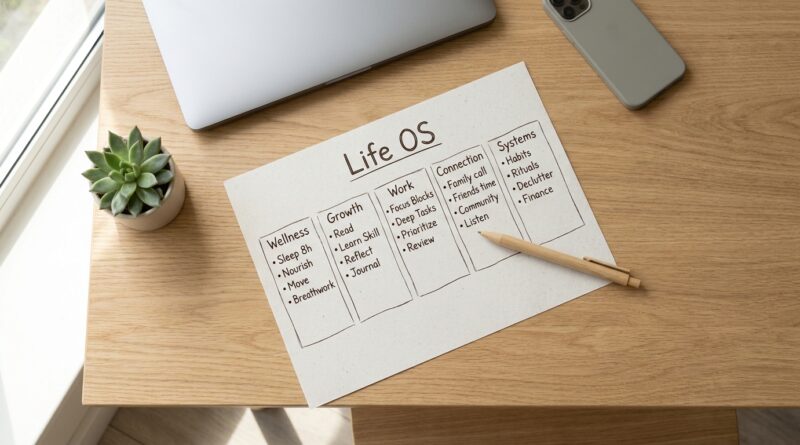
The 5-Pillar One-Page Life OS: A Minimalist Way To Run Your Whole Week Without Another App
You do not need a more complicated system. You probably need a smaller one. If your week is scattered across a notes app, a calendar, three half-built templates, and that task manager you keep meaning to clean up, you are not failing. Your setup is. A lot of “Life OS” advice sounds smart until you realize you are spending more time feeding the machine than living your actual life. That is exhausting.
A minimalist one page life os system fixes that by cutting your planning down to one page for the next seven days. Not forever. Just this week. One page. Five pillars. A few clear decisions. That is enough to stop the swirl, see what matters, and move through your days with less friction. Think of it as a weekly control panel, not a productivity performance. It should help you remember, choose, and focus. It should not become another hobby disguised as self-improvement.
⚡ In a Hurry? Key Takeaways
- A minimalist one page life os system puts your whole week on a single page using five simple pillars.
- Start with one weekly page that covers priorities, schedule, tasks, personal life, and reset notes.
- If your system takes longer to maintain than it saves, it is too complicated and needs trimming.
Why most Life OS setups fall apart
They start with a good idea. Get your life organized. Reduce stress. Keep everything in one place.
Then things drift.
You add databases. Tags. dashboards. Automations. Color codes. Soon the “system” becomes a part-time job. Miss a few days, and the whole thing feels broken. So you avoid it. Then guilt kicks in, which is somehow worse than having no system at all.
The problem is not that you need more discipline. Most people are already carrying too much mental load. What they need is a system that works even when energy is low.
That is where a one-page weekly setup shines. It is hard to overbuild. Easy to review. Easy to restart.
What a minimalist one page life os system actually is
It is one page that holds the only things you need to steer the next seven days.
Not your whole life story. Not every someday idea. Not every project detail.
Just this week.
The five pillars
Here is the simple structure:
- Pillar 1: Big Priorities. The one to three outcomes that would make this week feel solid.
- Pillar 2: Time Anchors. Appointments, deadlines, and fixed commitments.
- Pillar 3: Must-Do Tasks. The key actions that move life forward.
- Pillar 4: Personal Maintenance. Sleep, meals, exercise, family, errands, and basic human upkeep.
- Pillar 5: Reset and Review. Notes, loose ends, and what to carry into next week.
That is the whole system. One page. Five boxes, or five sections. Paper works. A basic note works. A plain document works.
How to build your one-page weekly system
1. Put your week on a single page
Use whatever tool you already trust. A notebook. Google Doc. Apple Notes. Notion, if you promise not to turn this into a renovation project.
Label the page with the week. Then split it into five sections.
Done.
2. Choose your weekly priorities first
This is where most people go wrong. They start with a giant task list, then get buried.
Instead, start with outcomes.
Ask yourself: “If this week goes reasonably well, what got done?”
Examples:
- Finish the proposal and send it by Thursday
- Book the dentist and handle two financial admin tasks
- Have three distraction-free workouts
Keep it short. If everything is a priority, nothing is.
3. Add your fixed time anchors
Now look at your calendar. Pull in only the things that shape your week.
This can include:
- Meetings
- School events
- Deadlines
- Travel
- Appointments
You are not recreating your whole calendar. You are marking the moments that affect what is realistic.
This matters because a good planning system should tell the truth. If Wednesday is packed, your page should make that obvious.
4. Write your must-do tasks, not every possible task
This list should support your priorities, not compete with them.
Think “essential moves,” not “brain dump of doom.”
A good weekly task section might have 8 to 15 items. Not 47.
If you need a rule, use this one: if a task does not matter this week, it does not belong on the page.
5. Include your real life, not just your work
This is the part many systems ignore. Then people wonder why they feel behind all the time.
Your life is not made of projects alone.
Add things like:
- Grocery run
- Call your parents
- Gym twice
- Meal prep Sunday
- Bed by 11 most nights
This section keeps the page grounded in reality. It also stops your personal life from becoming the invisible category that always gets squeezed out.
6. End with a reset box
Leave a small section for leftovers, notes, and next-week reminders.
That way, unfinished items do not float around your head all weekend.
This also makes restarting easier. The system never asks you to begin from scratch.
What this looks like in practice
Here is a rough example of a weekly one-page setup:
Big Priorities
- Submit client draft
- Sort car insurance renewal
- Work out three times
Time Anchors
- Monday 10 AM team meeting
- Wednesday doctor appointment
- Thursday proposal deadline
- Saturday family lunch
Must-Do Tasks
- Draft proposal intro
- Review budget
- Email accountant
- Pick up prescription
- Plan Friday presentation
Personal Maintenance
- Walk after dinner 4x
- Grocery shop Tuesday
- Lights out by 11 PM
Reset and Review
- Renew library card
- Move conference idea to next week
- Cancel unused subscription
That is enough to run a week. No dashboard required.
Why this works better than bigger systems
It reduces decision fatigue.
Instead of checking five places and reinterpreting your own plans every morning, you have one simple view. That creates calm. It also makes follow-through much easier.
This approach also respects how people actually live. Weeks are messy. Energy changes. Surprises happen. A one-page system bends without collapsing.
If you want to make each day feel more intentional once your week is set, it pairs nicely with The 5-Pillar No‑Neutral Day: A Minimalist Way To Turn ‘Just Another Day’ Into Real Progress. The weekly page gives you direction. A simple daily lens helps you act on it.
Common mistakes to avoid
Turning one page into a tiny dashboard empire
If you start adding ten sub-sections, progress bars, and tracking widgets, stop. You are rebuilding the problem.
Using the page as a guilt document
This page is not there to prove how ambitious you are. It is there to help you do what matters. Keep it honest. Keep it humane.
Planning too much in detail
You do not need to map every hour unless your week truly demands it. Usually, a few clear anchors plus focused priorities is enough.
Forgetting maintenance tasks
Laundry, sleep, errands, meals, recovery. These are not side quests. They are part of the operating system.
Best tools for a minimalist one-page setup
The best tool is the one you will still use on a tired Thursday.
Paper notebook
Great for focus. No notifications. Very low friction.
Simple notes app
Good if you want quick edits and access on your phone.
Basic document
Useful if you like typing and want to duplicate the same format each week.
Notice what is missing here. You do not need a special app. You do not need a subscription. You do not need a system that impresses strangers on YouTube.
How to keep it going without burning out
Set a weekly reset time. Twenty minutes is enough.
Try Sunday evening or Monday morning. Review the past week. Move over what still matters. Delete what does not. Choose your priorities. Add your anchors.
That is it.
The goal is not perfect consistency. The goal is easy return. A good system welcomes you back fast, even after a chaotic week.
At a Glance: Comparison
| Feature/Aspect | Details | Verdict |
|---|---|---|
| Setup time | Usually 10 to 20 minutes a week with five simple sections | Fast enough to maintain |
| Complexity | One page covers priorities, schedule, tasks, life admin, and review | Low stress, high clarity |
| Tools required | Notebook, notes app, or plain document you already have | No new app needed |
Conclusion
A lot of productivity advice is still pushing people toward bigger stacks, smarter automations, and polished “second brains.” But most people are not short on systems. They are tired of them. A minimalist one page life os system gives you one place to centralize what matters for the next seven days without signing up for another app, subscription, or dashboard. That is especially useful when mid-year fatigue hits and overbuilt setups quietly stop being used. Keep it small. Keep it visible. Keep it honest. If one page helps you focus, follow through, and breathe a little easier, then it is doing exactly what a good system should.