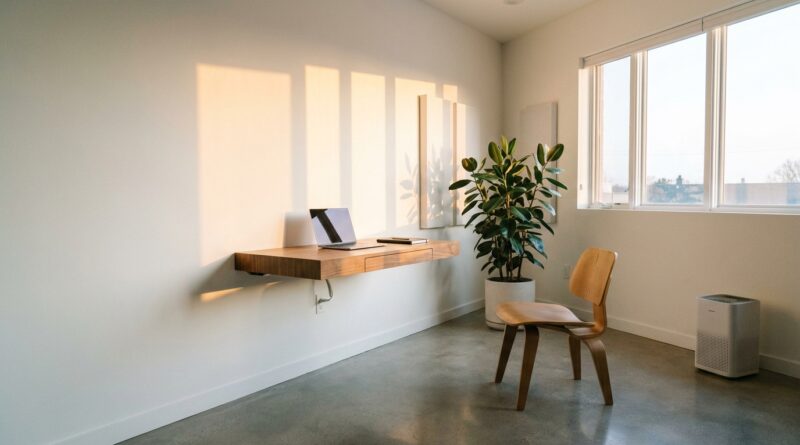
The 5‑Pillar Machine‑For‑Living Workday: A Minimalist Way To Turn Your Space Into Quiet Output
You are not lazy. Your room may just be fighting you. That is the frustrating part of modern work. You can spend hours fixing your task app, color-coding your calendar, and building the perfect morning routine, then lose your focus by lunch because the glare on your screen is harsh, the chair is wrong, the room feels stuffy, and every little object on your desk is asking for attention. A lot of productivity advice acts like your willpower is the problem. Often, it is not. Often, the problem is physical. If you want a better workday, start with the space around your body. Think of it as a machine for living and working, but stripped down to five simple controls: light, air, sound, posture, and visual noise. Get those five right, and your workspace starts helping instead of draining you. That is the whole idea behind these minimalist productivity workspace pillars.
⚡ In a Hurry? Key Takeaways
- The fastest way to improve focus is often to fix your room, not download another app.
- Use five simple switches for your workspace: better light, fresher air, steadier sound, kinder posture, and less visual clutter.
- You do not need a shopping spree. Small changes, even free ones, can cut fatigue and make deep work easier to hold onto.
Why your workspace matters more than you think
Most of us blame ourselves first. We say we need more discipline, a tighter routine, or a smarter system.
Sometimes that is true. But a lot of the time, your environment is quietly making every task harder.
Bad light strains your eyes. Stale air makes you sleepy. Random noise keeps pulling your attention sideways. A poor chair or desk setup turns your back, neck, and wrists into a running complaint. Clutter fills your peripheral vision with tiny unfinished business.
None of that feels dramatic in the moment. It just feels like a vague drop in energy. Then 3 p.m. hits and your brain feels like wet cardboard.
That is why a minimalist approach works so well. Instead of chasing twenty productivity tricks, you tune five parts of the room that affect you all day.
The 5-pillar machine-for-living workday
Think of these as five switches. You do not need a perfect office. You just need each switch moved from “working against me” to “mostly helping me.”
1. Light: Stop making your eyes do extra work
Light sets the tone for alertness faster than people realize. If your workspace is dim, glary, or uneven, your eyes and brain are constantly compensating.
Start here:
- Face natural light if you can, but do not put a bright window directly behind your screen.
- If daylight is limited, use a lamp that lights your desk without shining straight into your eyes.
- Reduce screen glare. Shift the monitor angle. Close a blind halfway. Move the desk a foot to the left. Small moves matter.
- By late afternoon, brighten the space a bit before your energy crashes. Many people keep working in a cave and wonder why they fade.
The goal is simple. You should be able to read, type, and look at your screen without squinting, leaning in, or feeling washed out.
2. Air: Your brain likes oxygen more than productivity hacks
This one gets ignored because bad air is easy to get used to. A room can feel normal and still leave you foggy.
Try this:
- Open a window for a few minutes when possible, especially before focused work.
- Use a fan if the room feels stagnant.
- Do not let the room drift too hot. Warm, stuffy spaces are excellent at killing concentration.
- Keep water nearby so “I need a break” is not really “I forgot basic maintenance.”
You do not need to turn into an indoor climate engineer. Just ask one question a few times a day: does this room feel fresh, or heavy?
3. Sound: Replace random noise with predictable sound
Noise is not only about volume. Randomness is the bigger problem. A steady fan hum is often easier to work through than unpredictable chatter, traffic bursts, or notifications.
Your options:
- Turn off non-essential notification sounds. Your phone should not sound like a slot machine.
- Use soft background sound if it helps, like rain, brown noise, or instrumental music.
- If the space is shared, headphones can help, but do not wear them so long that they become their own discomfort.
- Create “sound expectations” with people around you. Even a simple “I am doing focus work until 11” can cut interruptions.
The best sound setup is not exciting. It is boring, steady, and easy to ignore.
4. Posture: Make the right position the easy position
If your body is tense, your mind pays for it. You cannot do great thinking while your shoulders are climbing toward your ears.
Good posture advice often gets weird and strict. Keep it basic:
- Raise your screen so you are not constantly dipping your head.
- Get your keyboard and mouse where your shoulders can relax.
- Put your feet on the floor or on a stable support.
- Sit back enough that the chair actually helps you.
- Stand up between work blocks. Even 60 seconds counts.
This is not about sitting like a statue. It is about removing low-grade strain so your body stops stealing attention.
5. Visual noise: Clear what your brain keeps tripping over
Clutter is not only a cleaning issue. It is a focus issue.
Every sticky note, cable knot, unopened package, and random object in view asks for a tiny bit of mental processing. On its own, no big deal. Together, it adds friction.
Do this before your next work block:
- Keep only what the current task needs within arm’s reach.
- Move unrelated papers into one tray or folder.
- Hide cables if you can. Even rough cable control helps.
- Leave one visually calm zone in front of you.
Minimalism here is not about making your desk look like a showroom. It is about giving your attention fewer places to leak.
How to reset your space in 5 minutes
If all of this sounds good but also like one more project, do not overbuild it.
Try this five-minute reset:
- Turn on better light or adjust blinds.
- Open a window or start airflow.
- Silence noisy notifications.
- Adjust chair, screen, and keyboard.
- Clear the desk down to the essentials for the next task.
That is it. Five switches. Done.
If you like this kind of stripped-back thinking, The 5‑Pillar Buy‑Nothing Workweek: A Minimalist Way To Get More Done By Needing Less Stuff makes a similar point from another angle. You do not always need more tools. Sometimes you need fewer demands on your attention.
What not to do
A few traps are common.
Do not buy your way into a better workday too fast
A new lamp, chair, or monitor arm can help. But first test free changes. Move the desk. Raise the laptop on books. Use a folded towel as temporary support. Open the window. Remove three distracting objects.
Do not optimize everything at once
If you try to rebuild the whole room in one Saturday, you will make this feel bigger than it is. Pick the pillar causing the most pain.
Do not confuse stimulation with focus
Some setups look “productive” because they are full of gadgets, colored lights, and screens. That can feel energizing for ten minutes and exhausting by hour three.
A simple way to find your weakest pillar
Ask yourself these questions at about 3 p.m., when the truth usually shows up:
- Am I squinting or getting headaches? That is probably light.
- Do I feel sleepy and flat? Check air and temperature.
- Am I getting pulled out of tasks by little sounds? Fix sound.
- Is my neck, back, or wrist complaining? Work on posture.
- Do I feel mentally crowded before I even start? Reduce visual noise.
You do not need a full diagnosis. You need one honest answer and one small fix.
At a Glance: Comparison
| Feature/Aspect | Details | Verdict |
|---|---|---|
| Light and screen comfort | Natural light, reduced glare, and a brighter late-day setup help cut eye strain and mental fatigue. | One of the fastest wins. |
| Air and sound control | Fresh air, cooler temperature, and predictable background sound support longer focus blocks. | Low effort, high payoff. |
| Posture and visual noise | A kinder body position and a cleaner sightline reduce irritation, fidgeting, and attention drift. | Best for steady, quiet output. |
Conclusion
Right now, everyone is obsessing over AI tools, clever systems, and the next big shortcut. Meanwhile, the room you work in is quietly deciding how much focus you actually have. Light, air, sound, posture, and visual noise are not glamorous. They are just important. The good news is that they are also fixable. If you treat your workspace like a minimalist cockpit and flip these five simple switches, you can get more done with fewer apps, less self-blame, and almost no ongoing effort. Start small. Fix one pillar today. Your brain will notice, even if your Instagram feed does not.