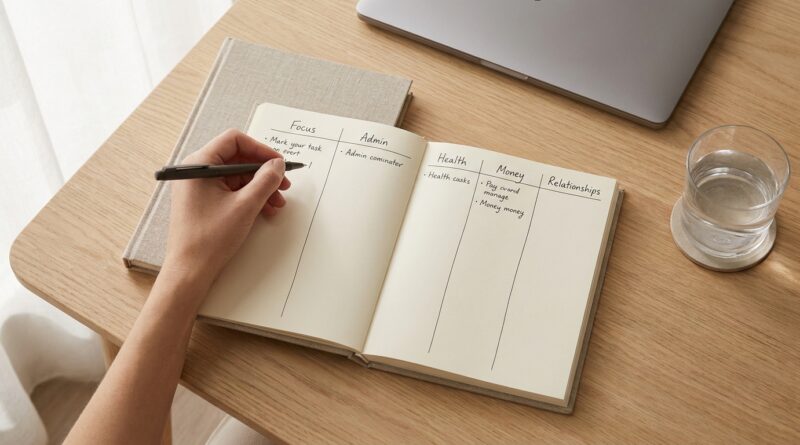
The 5‑Pillar One‑List System: A Minimalist Way To Stop Drowning In Tasks And Still Move What Matters
You do not need another app. You probably do not need a smarter dashboard either. If your tasks are scattered across email flags, sticky notes, chat messages, your Notes app and three different productivity tools, the problem is not that you are lazy. The problem is that your brain has too many places to check. That creates a constant low-grade panic. You work all day, yet the important stuff still sits there, staring at you. A minimalist one list productivity system fixes that by giving everything one trusted home. Not ten homes. One. The 5-Pillar One-List System is simple on purpose. You keep a single master list and sort every task into five parts of life that actually matter. Then you do a quick daily reset so nothing goes stale. It is not fancy. That is why it works. When the system is easy to trust, you stop managing the tool and start moving your real work forward.
⚡ In a Hurry? Key Takeaways
- A minimalist one list productivity system keeps all tasks in one trusted place, sorted into five life categories so you can see what matters fast.
- Start with one page, five headings, and a 5-minute daily reset. Capture everything, then choose just a few must-do items for today.
- The goal is less mental clutter, not perfect organization. If your system feels hard to maintain, it is too complicated.
Why most task systems fall apart
Most people are not failing because they lack discipline. They are failing because they have too many inboxes.
A reminder lives in text messages. A deadline sits in email. A personal errand is scribbled on paper. A work idea is buried in Slack. Then a productivity app starts sending cheerful nudges about all the things you already feel guilty about.
That is not a system. That is a scavenger hunt.
Every extra place you store tasks creates friction. Friction turns into delay. Delay turns into stress. And stress makes it harder to decide what to do next.
What the 5-Pillar One-List System is
The idea is simple. You keep one master list for everything you need to track. Then you divide it into five pillars that cover the main parts of modern life.
The five pillars
You can name these to fit your life, but a practical version looks like this:
- Work: deadlines, projects, follow-ups, admin
- Home: chores, repairs, shopping, bills
- People: family tasks, school items, calls, relationships
- Self: health, exercise, appointments, personal admin
- Dreams: creative work, side projects, learning, long-term goals
That last pillar matters more than people think. Without a place for meaningful but non-urgent work, your list becomes nothing but maintenance. Life turns into email, dishes and forms.
Why one list works better than many
A single list does three useful things.
1. It reduces decision fatigue
You stop asking, “Where did I put that?” ten times a day.
2. It shows your real workload
When everything is visible in one place, you can stop pretending you have time for 47 tasks today.
3. It protects what matters
The important work stops getting buried under random small stuff.
If your days often collapse by noon, pair this list system with your energy, not just the clock. That is where The 5-Pillar Energy-First Workday: A Minimalist Way To Get More Done By Managing Your Battery, Not Your Hours fits nicely. A clean list helps you see the work. An energy-first day helps you do it at the right time.
How to build your minimalist one list productivity system
You can set this up in a notes app, on paper, in a simple document or in a basic task app. Do not overthink the tool. The best tool is the one you will actually open every day.
Step 1: Pick one trusted home
Choose one place for the list. Just one.
Good options:
- A paper notebook if you like writing by hand
- Apple Notes, Google Keep or OneNote if you want simple digital access
- Todoist or Microsoft To Do if you prefer checkboxes and due dates
Bad option: setting up a complicated stack you need a tutorial to maintain.
Step 2: Create five headings
Add your five pillars as section titles. Keep them broad enough to cover your life, but not so broad that everything feels vague.
Step 3: Dump in everything
Now do a full capture. Get the loose tasks out of your head and into the list.
Pull from:
- Texts
- Sticky notes
- Your calendar
- Your downloads folder
- Your brain at 2 a.m.
Do not organize beautifully at first. Just collect.
Step 4: Rewrite vague tasks into clear next actions
“Fix taxes” is heavy and fuzzy. “Email accountant for missing form” is better.
“Get healthy” is useless. “Book annual checkup” works.
A list should tell you what to do, not remind you that you are behind.
Step 5: Mark today’s top few tasks
Each day, pick two to five items that truly matter. Not twenty. Not “everything if possible.” A short daily focus keeps the big list from becoming wallpaper.
The daily reset that keeps the whole thing alive
This is the part that makes the system work long-term.
At the end of the day, or first thing the next morning, spend five minutes on a reset:
- Check off what is done
- Move unfinished tasks forward
- Delete things that no longer matter
- Add any new tasks that showed up
- Choose your next few priorities
That is it. No weekly life audit with twelve colored tags. No ritual that takes longer than the work itself.
What this system is not
It is not a promise that every area of life will stay balanced every day.
It is not an excuse to dump hundreds of tasks onto one page and then stare at it in horror.
It is not a perfect planner for every personality.
It is a low-friction way to make sure nothing important gets lost and the right things stay visible.
Common mistakes to avoid
Using one list, but still keeping secret side lists
If you still save tasks in random places “just for now,” you are breaking trust with your system.
Confusing projects with next actions
“Launch website” is a project. “Send homepage draft to designer” is an action.
Putting every dream on today’s list
Your master list can hold many things. Your daily focus should hold only a few.
Making the setup prettier than it is useful
If formatting the system becomes the hobby, the system is no longer helping.
Who this works especially well for
This setup is great for people whose lives mix different roles all day long.
- Knowledge workers switching between meetings and deep work
- Parents managing both job tasks and family logistics
- Creatives trying to protect time for meaningful work
- Anyone tired of bloated productivity tools
It is especially helpful if you like minimalist living. One page. Clear categories. Less mental noise.
At a Glance: Comparison
| Feature/Aspect | Details | Verdict |
|---|---|---|
| Number of capture points | One trusted list instead of scattered notes, apps and inboxes | Much easier to maintain |
| Task organization | Five clear pillars cover work, home, people, self and meaningful long-term goals | Simple but complete for most people |
| Daily upkeep | A quick 5-minute reset to review, clean up and choose priorities | Realistic for busy, tired humans |
Conclusion
Right now, a lot of people are drowning in bloated productivity stacks, clever dashboards and constant digital noise, while still feeling behind on the basic work that actually moves life forward. The good news is that you do not need a more complex fix. A simple five-pillar one-list system gives you one trusted page, five categories that reflect real life, and a daily reset that takes minutes instead of hours. That means less decision fatigue, less guilt and a better shot at making progress on what matters. For tired knowledge workers, parents and creatives, this is not another framework to manage. It is a calmer way to see your life clearly and get moving again.