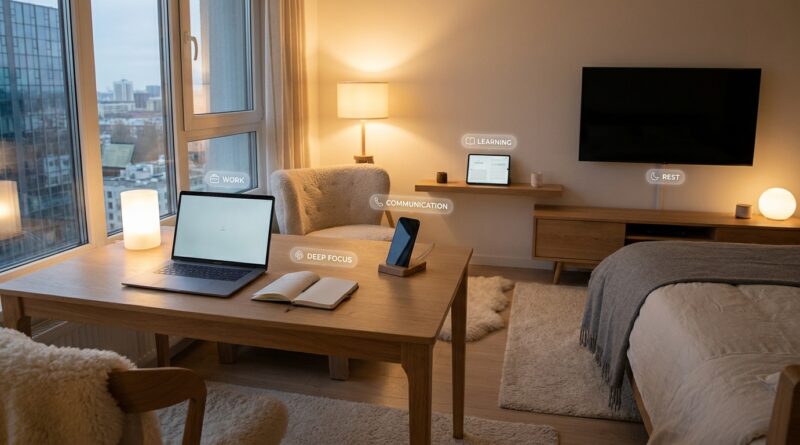
The 5‑Device Life: A Minimalist Way To Turn Your Screens Into Allies Instead Of Enemies
You are not failing at “digital balance.” You are probably just outnumbered. A lot of people tidy up their phone, mute a few apps, maybe even try a weekend detox, then wonder why they still feel mentally crowded. The reason is simple. Your attention is being split across too many screens with no clear job description. The phone handles messages, but also news and shopping. The laptop is for work, except it is also where you pay bills and watch YouTube. The tablet is for reading, until email sneaks in. The TV is for relaxing, until it starts serving up endless recommendations. Bit by bit, every device becomes an everything machine. That is exhausting. A better fix is not stricter willpower. It is a minimalist system to control multiple devices and reduce screen overwhelm. Give each device one main role, keep the boundaries simple, and your screens start working for you instead of pulling at you all day.
⚡ In a Hurry? Key Takeaways
- The simplest fix for screen overload is not fewer apps. It is giving each device one clear purpose.
- Start with a five-device setup: phone for communication, computer for work, tablet for reading, TV for shared entertainment, wearable optional for health only.
- This setup protects focus, sleep, and relationships because it cuts down the constant switching that makes every screen feel urgent.
The real problem is device sprawl
Most advice about screen habits focuses on one device at a time. Clean your home screen. Turn off notifications. Delete social media for a week. Those tips can help, but they miss the bigger issue.
Your devices overlap.
That overlap creates friction all day long. You pick up your phone to text your sister and get pulled into work chat. You open your laptop to finish a report and end up checking airline prices for a trip. You sit down with the TV to relax and spend 25 minutes choosing what to watch. None of this looks dramatic. It just steadily drains your attention.
The fix is to stop asking every device to do everything.
The 5-device life, explained simply
The idea is not that everybody must own exactly five devices. It is a framework. Think of it as five roles that cover modern digital life without turning every screen into a free-for-all.
1. The phone: communication and quick capture
Your phone should be your pocket tool, not your portable chaos machine. Its main jobs are calls, texts, maps, camera, two-factor codes, and quick notes.
What does not belong here? Long-form work, doomscrolling, and “just for a minute” entertainment that turns into 45 minutes.
A good phone rule is this: if a task takes focus, it moves to another device.
2. The computer: work and admin
This can be a laptop or desktop. For many people, it may be one machine for work and life, or a work laptop plus a personal computer. The key is still the same. The computer is where focused tasks live.
Use it for writing, spreadsheets, planning, booking travel, paying bills, and anything that needs a real keyboard and sustained attention.
If you work from home, this matters even more. The less your phone becomes a mini office, the easier it is to mentally clock out later.
3. The tablet or e-reader: reading and light learning
This is the screen that often gets wasted. Many people let it become a backup phone. That is a mistake.
A tablet works best as a calm device. Reading books, saved articles, recipes, classes, sheet music, hobbies. It should feel slower and quieter than your phone.
If your tablet pings with the same alerts as your phone, it has lost its purpose.
4. The TV: intentional entertainment
The TV should do one thing well. Shared, sit-down entertainment. Movies, shows, sports, a game night, maybe a workout video.
It should not become an all-evening drift machine with three people half-watching while also on their phones. If possible, keep the TV for content you choose on purpose, not endless autoplay.
5. The wearable: optional, and only if it stays in its lane
Smartwatches and fitness bands can be useful, but only if they reduce phone checking instead of increasing it.
Best case, a wearable handles health tracking, timers, and a small set of high-priority alerts. Worst case, it becomes one more buzzing device asking for attention on your wrist.
If it is making you more twitchy, take it off. Minimalism includes deciding not to use a gadget that adds noise.
How to assign “what lives where”
This is the part that makes the system stick. You need rules, not hopes.
Start with categories, not apps
Do not begin by sorting every single app. Start bigger. Ask:
- Where do communication tasks happen?
- Where does focused work happen?
- Where does reading happen?
- Where does entertainment happen?
- Where do health and alerts happen?
Once you assign categories, app decisions become easier. Email might stay on your phone for emergencies, but real replies happen on the computer. Streaming apps stay on the TV, not every device you own.
Make one device the “default” for each task
If every task can happen everywhere, your brain never rests. Pick a home base.
Examples:
- Messaging default: phone
- Documents default: computer
- Books default: tablet or e-reader
- Shows default: TV
- Workout tracking default: wearable
This small change cuts down constant switching. It also lowers the weird mental load of deciding where to start every time.
Let some devices be boring
This is underrated. Not every gadget needs to be exciting. In fact, boring is often the goal.
Your tablet should not tempt you the way your phone does. Your TV should not function like a billboard. Your watch should not be a tiny social network.
A little less stimulation often feels like a lot more peace.
A practical setup for normal households
You do not need to buy anything new. Most people can do this with what they already own.
If you have one phone, one laptop, one tablet, one TV, one watch
- Phone: calls, messages, maps, camera, essential alerts
- Laptop: work, bills, forms, shopping, planning
- Tablet: reading, courses, recipes, hobbies
- TV: movies, shows, sports, family viewing
- Watch: fitness, timers, only top-tier alerts
If you have more than five devices
This is where the system really helps. A second phone, a work laptop, a gaming console, a spare tablet. Fine. Just do not give them duplicate roles unless there is a real reason.
For example, if you have a work laptop and personal laptop, set a hard line. Work laptop for work only. Personal laptop for bills, travel, creative projects, and personal email. No casual web wandering on the work machine. No work chat on the personal one.
The point is not to count gadgets. The point is to reduce overlap.
The rules that make it work day to day
A framework is helpful. Daily rules are what turn it into real relief.
Rule 1. No entertainment on the work device
This protects focus during the day and helps your brain separate effort from rest.
Rule 2. No serious work on the phone
Quick replies are fine. Real tasks move to the computer. Phones make everything feel urgent and fragmented.
Rule 3. No notifications on the tablet unless they truly belong there
If a reading device starts acting like a second phone, it stops being useful.
Rule 4. The TV is for chosen viewing, not background drift
If nobody is actually watching, turn it off.
Rule 5. The wearable gets only VIP interruptions
Think family, calendar, alarm, maybe one work contact if your job requires it. Not every app deserves a tap on your wrist.
How this helps focus, sleep, and relationships
This is not just about tidiness. It changes how your day feels.
Better focus
When work belongs on one device, your brain stops bouncing so much. You are less likely to wander into random tasks because the device itself reminds you what you are there to do.
Better sleep
If late-night reading happens on a tablet or e-reader and not on your all-purpose phone, bedtime gets calmer. If the TV is not running autoplay into midnight, even better.
Better relationships
People notice when you are always half-available. A clean device setup makes it easier to be fully present. Dinner is not interrupted by work on your phone. Family movie time stays on the TV instead of splitting into five separate feeds.
Common mistakes people make
Trying to optimize everything at once
Do not spend six hours rebuilding your digital life in one weekend. Start with one rule per device.
Keeping every notification “just in case”
Most alerts are somebody else’s priorities arriving in your pocket. Be strict.
Confusing convenience with usefulness
Yes, it is convenient to have everything everywhere. It is also exactly how device overload starts.
Using the phone as a filler for every empty moment
That habit can undo the whole system. The phone needs limits because it is the easiest device to overuse.
A simple 7-day reset
If you want to try this without overthinking it, do this for one week.
- Day 1: Write down every screen you use.
- Day 2: Assign one primary role to each device.
- Day 3: Remove one category of apps from the wrong device.
- Day 4: Turn off non-essential notifications on tablet, TV, and wearable.
- Day 5: Move one recurring task to its proper home. Bills to computer, reading to tablet, and so on.
- Day 6: Create one phone-free block in the evening.
- Day 7: Notice what felt easier, then keep only the rules that actually helped.
You are not trying to become a monk. You are building a home for your attention.
At a Glance: Comparison
| Feature/Aspect | Details | Verdict |
|---|---|---|
| Traditional “everything on every device” setup | Email, chat, streaming, shopping, reading, and work scattered across all screens | Convenient at first, mentally tiring over time |
| Five-device minimalist system | Each device has one main role and fewer overlapping tasks | Best for reducing screen overwhelm and decision fatigue |
| Short digital detox approach | Temporary break from apps or screens without changing device roles | Can help briefly, but often does not fix the underlying sprawl |
Conclusion
Right now, a lot of the advice out there is stuck on app decluttering and quick detoxes. That is not useless, but it is often aimed at the wrong problem. The bigger issue is device sprawl. Work laptop, personal laptop, two phones, tablet, smartwatch, TV. They all start bleeding into each other until every screen feels like work, temptation, or both. A simple five-device framework gives you something better than guilt. It gives you rules. Clear jobs for each screen. Less overlap. Fewer interruptions. More room to focus, sleep, and actually be with the people in front of you. You do not need perfect discipline. You just need your devices to stop competing for every piece of your day.