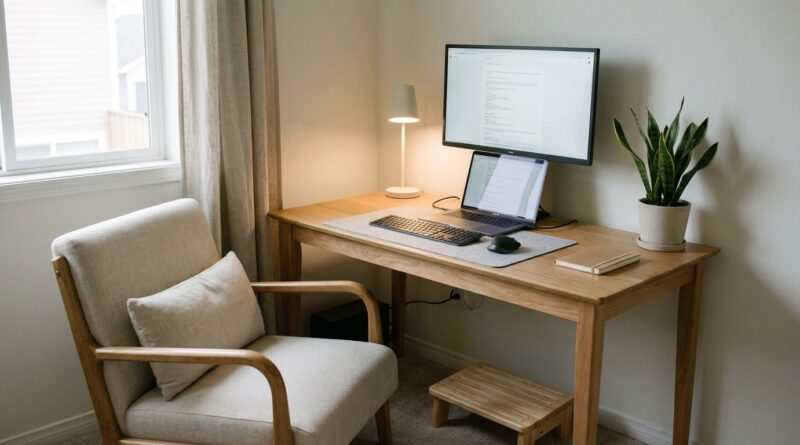
The 5‑Pillar Ergonomic Focus Nook: A Minimalist Way To Turn One Seat Into All‑Day Energy
By 4 p.m., your neck is tight, your eyes feel grainy, and your desk looks like it multiplied while you were on your third video call. That is a miserable way to end a workday, especially when you were just trying to make one corner of your home do everything. The annoying part is that most advice for a minimalist ergonomic home office setup goes straight to expensive chairs, fancy monitor arms, and giant desk makeovers. Most people do not need a shopping spree. They need a system. A small one. One seat, one surface, five smart fixes. If you can give this next hour, you can make your body happier, your screen easier to look at, and your workspace a lot less mentally loud. Think of this as building a focus nook, not a showroom. The goal is simple. Less strain, less clutter, and enough energy left at the end of the day to feel like a person again.
⚡ In a Hurry? Key Takeaways
- Your best fix is not more gear. It is aligning chair, screen, keyboard, light, and clutter into one simple working zone.
- You can improve comfort fast with household items like books, a folded towel, a box, and one small catch-all tray.
- If pain is sharp, numbness spreads, or headaches keep returning, treat ergonomics as support, not medical care, and check with a clinician.
The 5-Pillar Focus Nook
Here is the big idea. A good workspace is not one perfect product. It is five conditions working together. When one is off, your body compensates. When two or three are off, your focus pays for it.
These five pillars are posture, screen position, hand placement, visual calm, and reset rhythm. Fix those, and a plain corner starts working a lot harder for you.
Pillar 1: Build the Seat Around Your Body, Not the Other Way Around
Your chair does not have to be fancy. It does have to stop fighting you.
Start with your feet
Put both feet flat on the floor. If they do not reach comfortably, use a sturdy box, stack of books, or a low footrest. The goal is simple. Your thighs should feel supported, not dangling.
Give your lower back something to push against
If your chair has a gap behind your lower back, roll up a small towel and place it there. This tiny fix can stop that slow end-of-day slumping that turns into neck tension.
Check your elbows
When your hands rest near your keyboard, your elbows should sit close to your sides at about a right angle. If your shoulders creep up, the surface is too high. If you are collapsing forward, the setup is too low or too far away.
This is the first pillar because your body is the foundation. If the seat is off, everything above it starts improvising.
Pillar 2: Raise the Screen So Your Neck Can Relax
This is where many home setups go wrong. Laptops are convenient, but they are terrible at being both screen and keyboard at the right height at the same time.
The easy rule
The top third of your screen should be around eye level. Not chin level. Not desk level. Eye level.
Use what you have
Put your laptop or monitor on a stack of books or a sturdy riser. If you raise a laptop, pair it with an external keyboard and mouse if you have them. If you do not, even a cheap spare keyboard from a drawer is better than hunching all day.
Find the right distance
Sit back in your chair and extend your arm. Your screen should land roughly around that distance, give or take. If you are leaning in to read, increase text size before you move your face closer.
Your neck likes neutrality. Every inch your head moves forward increases strain. That is why this one change often feels dramatic within a day.
Pillar 3: Create a Low-Strain Hand Zone
People notice neck pain first, but wrists and shoulders often start the trouble.
Bring tools into your natural reach
Your keyboard and mouse should live close enough that your elbows stay near your torso. If you have to reach forward all day, your shoulders stay tense without you noticing.
Keep wrists mostly straight
You do not need to lock them rigid. Just avoid the sharp upward bend that happens when your keyboard sits too high. A thin folded cloth can soften a hard desk edge, but skip giant wrist pads that force your hands upward.
Make one side your capture zone
Pick a left or right corner for your notebook, water, and one pen. That cuts the little searching motions that break concentration more than you think.
If your setup feels busy, this is also a good time to borrow a ritual from The 5‑Sense Desk: A Minimalist Workspace Ritual That Calms Your Nervous System And Doubles Your Focus. Small sensory tweaks can make a plain desk feel calmer without adding clutter.
Pillar 4: Reduce Visual Noise So Your Brain Stops Working Overtime
Not all fatigue is physical. Some of it is your brain processing too much visual junk all day.
Clear the first field of view
When you look up from your keyboard, what do you see? Keep that zone clean. Leave only what supports your current task. Everything else should go behind you, below the desk, or into one contained spot.
Use one tray, basket, or box
This is the cheat code for clutter. Instead of trying to organize ten small things, give them one landing place. Chargers, sticky notes, receipts, random cables. Into the box.
Calm the background
If your screen faces a busy room, turn slightly or place a simple object in the visual line behind it. A lamp, plain wall, or plant is easier on the brain than a kitchen full of movement.
Minimalist does not mean empty. It means your space is not asking for attention every two seconds.
Pillar 5: Build Movement and Eye Breaks Into the Nook
The best ergonomic setup in the world still loses if you freeze in it for six hours.
Try the 30-30 pattern
Every 30 minutes, spend 30 seconds doing something different. Stand up. Roll your shoulders. Look across the room. Refill water. That is enough to break the spell.
Give your eyes a far target
Pick one object across the room or out a window. Each time you finish a task, look at it for a few seconds. This helps reduce that locked-in screen stare that leaves your eyes tired and your head foggy.
Create an end-of-day reset
Before you leave your chair, put items back in their zones and close the work loop. That way tomorrow starts clean. More important, your brain gets a signal that work is done.
This may sound minor. It is not. People who work in mixed home-office routines often carry the unfinished feeling of work into the evening. A 60-second reset helps cut that mental drag.
How to Set Up Your Focus Nook in the Next Hour
If you want the shortest path, do this in order.
Minute 1 to 10: Fix the chair
Set foot support. Add a towel for lower back support if needed. Adjust your sitting distance so your elbows can stay close to your body.
Minute 10 to 20: Raise the screen
Use books or a box. Get the top third of the display near eye level. Increase font size instead of craning forward.
Minute 20 to 30: Move keyboard and mouse into place
Pull them close. Remove anything in front of them. Make sure your wrists are not sharply bent.
Minute 30 to 45: Remove visual clutter
Clear what is directly in front of you. Add one tray or box for loose items. Keep only the tools for today’s work.
Minute 45 to 60: Add break cues
Set a quiet timer. Choose your far-view object. Put water within reach. Decide what your one-minute shutdown routine will be.
What You Do Not Need to Buy Right Away
A minimalist ergonomic home office setup is partly about comfort, but it is also about resisting the idea that every problem needs a purchase.
- You do not need a new desk if your current surface can hold a raised screen and clear hand space.
- You do not need a designer chair if your current one can be improved with foot support and lower-back padding.
- You do not need ten organizers. You need one drop zone and fewer items on the desk.
If you later want to upgrade, great. But first make the free changes. They often solve more than expected.
When Ergonomics Is Not Enough
Some symptoms are signs to look beyond desk tweaks. If you get numbness, tingling, frequent headaches, sharp pain, or pain that wakes you at night, it is worth checking in with a medical professional or physical therapist.
A workspace can reduce strain. It cannot diagnose why something hurts.
At a Glance: Comparison
| Feature/Aspect | Details | Verdict |
|---|---|---|
| Body comfort | Feet supported, lower back padded, elbows close to the body, screen near eye level | Biggest payoff for neck and shoulder relief |
| Focus and mental calm | Clear sightline, one clutter tray, fewer visible objects, simple end-of-day reset | Best fix for distraction creep and visual overload |
| Cost and effort | Uses books, towel, box, timer, and small layout changes instead of new gear | Low-cost, high-value starting point |
Conclusion
You do not need the internet’s ultimate desk setup. You need one corner that stops draining you. That is the real win. Home office ergonomics, distraction creep, and screen fatigue are climbing again because more of us are moving between office and home without a stable system. The answer is not more stuff. It is five small adjustments you can make in the next hour with what you already own. Support your body. Lift the screen. Bring your hands in close. Quiet the visual clutter. Add tiny reset breaks. That is how a single seat becomes an all-day energy nook. Start there, and you have a much better shot at finishing work without feeling like work finished you.