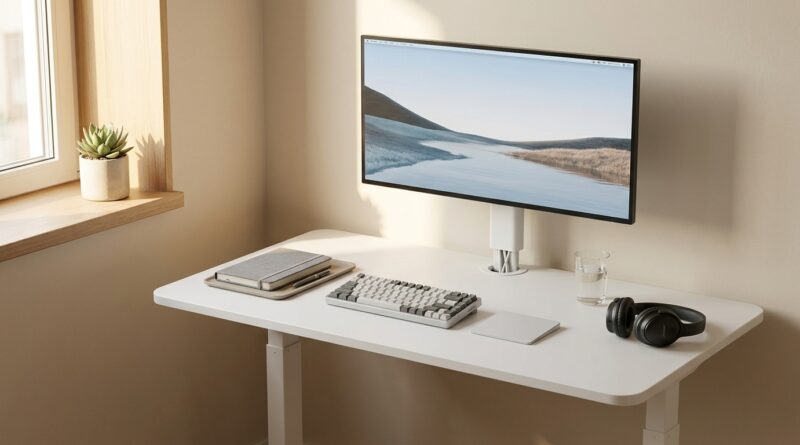
The 5‑Zone Standing Desk: A Minimalist Way To Turn One Surface Into A Full Focus System
Your standing desk probably meant well. Better posture. Better focus. A cleaner workday. Then real life happened. The monitor landed wherever it fit, chargers multiplied, notebooks stacked up, and suddenly your sleek new desk became a taller version of the old mess. That is frustrating, especially when the desk was supposed to help you feel better, not give your clutter a lift.
The fix is not buying more gear. It is giving the surface a job. A minimalist standing desk setup works best when the desk is split into five simple zones, each with one purpose. This keeps your body aligned, your cables under control, and your brain from scanning a dozen random objects every time you sit down. If you live in a small apartment, share a room, or bounce between office and home, this approach turns one surface into a full focus system instead of a catch-all shelf.
⚡ In a Hurry? Key Takeaways
- A minimalist standing desk setup works best when you divide the surface into five zones: screen, input, active work, quick access, and cable/power.
- Remove anything that does not support today’s work, then assign every remaining item a permanent home.
- If your monitor height, keyboard position, or cable slack are wrong, a standing desk can feel worse, not better.
Why standing desks disappoint so many people
Most standing desks fail for a boring reason. Nobody designs the workflow. They just move the same pile of stuff from one desk to another.
A motorized frame cannot fix visual noise. It cannot fix bad monitor height. It cannot fix the habit of using your desk as part office, part storage bin, part snack station.
That is why the five-zone method helps. It makes decisions once, so you stop making them all day.
The 5-zone standing desk system
Think of your desk like a tiny studio apartment. Every inch has to earn its keep. Here are the five zones.
Zone 1: The Focus Zone
This is the center. It holds the thing you spend most of your day looking at, usually your monitor or laptop screen.
Put the screen directly in front of you, not off to one side. The top of the screen should sit at or just below eye level. If you use a laptop as your main machine for long stretches, a stand helps a lot. Otherwise, you end up bending your neck down all day, whether sitting or standing.
If you use two displays, keep the primary one centered. Do not let a side monitor pull your whole body out of line.
Zone 2: The Input Zone
This is where your hands live. Keyboard, mouse, trackpad, maybe a wrist rest if it actually helps you.
Keep this zone shallow and clean. Your elbows should rest comfortably near your sides, with your forearms roughly level. If you have to reach forward for your mouse, the desk is too crowded.
For many people, this one change does more for comfort than the standing part itself.
Zone 3: The Active Work Zone
This is the area for the task in front of you right now. A notebook, planner, tablet, document tray, or one open reference book.
Not three notebooks. Not unopened mail. Not your headphones case, keys, and yesterday’s coffee receipt.
This zone should be easy to clear in under 30 seconds. If you often shift between typing and writing, keep this area just to your non-mouse side so you can slide between tasks without a full desk reset.
Zone 4: The Quick Access Zone
This is for the few things you need often, but not constantly. Water bottle. Headphones. Pen cup with two or three pens. Maybe a dock button, webcam cover, or task timer.
The rule is simple. If it is not used most days, it does not live here.
This is where minimalism becomes practical. You are not trying to own nothing. You are trying to stop reaching around junk to get to what matters.
Zone 5: The Power and Cable Zone
This is the least glamorous zone, and it is the one that makes the whole setup feel grown-up.
All power bricks, extra cable length, chargers, and adapters should be managed below the desktop or along the back edge. The point is to keep them off your working surface and out of your line of sight.
If your desk goes up and down, leave enough slack for movement, but not so much that cords dangle like vines. A small cable tray, adhesive clips, and a single power strip mounted under the desk can clean up 80 percent of the mess.
How to build a minimalist standing desk setup in 20 minutes
Step 1: Clear the desk completely
Yes, completely. If you leave items in place, your eyes will keep forgiving bad decisions.
Step 2: Put back only the daily essentials
Start with screen, keyboard, mouse, and one active work tool. Everything else waits.
Step 3: Assign each item to one zone
If an item does not clearly belong in one of the five zones, that tells you something. It is probably desk clutter, not desk equipment.
Step 4: Fix cable paths before the mess returns
This matters more than people think. Once cables are sorted, it is much harder for a desk to slide back into chaos.
Step 5: Test both sitting and standing positions
Raise and lower the desk. Check whether anything pulls, shifts, wobbles, or blocks movement. Your setup should work in both modes without needing a mini renovation.
What most people should keep, and what they should remove
Keep
One good screen. One solid input setup. One notebook or task pad. One water bottle. One lighting source if needed. One charging method.
Remove
Old mail. Backup cables you never touch. Decorative gadgets that eat space. Five pens that all barely work. Random boxes. Tech you keep meaning to sell.
If your room already feels busy, your desk should not compete with it. That is also why I like pairing this approach with broader room habits like The 5‑Window Day: A Minimalist Space Routine To Quiet Your Home And Sharpen Your Focus. A calm desk works even better in a calm room.
Best tools for a simple setup, without going gadget-crazy
Useful upgrades
A monitor arm if you need more depth. A laptop stand if the laptop is your main screen. A small under-desk cable tray. Reusable cable ties. A compact desk lamp. A slim drawer or side caddy if your desk has no storage at all.
Upgrades to question
Huge speaker sets on tiny desks. Oversized desk mats that become clutter traps. Fancy organizers with nothing useful in them. Massive docking stations sitting right in the middle of the surface.
The goal is not a desk that looks good in a product photo. It is a desk that makes work feel easier at 2:17 on a Wednesday.
Special advice for small apartments and hybrid workers
If your desk sits in a bedroom, living room, or shared corner, this five-zone layout matters even more. You do not have the luxury of spreading out. So your setup has to switch cleanly between work mode and home mode.
That means fewer permanent items on the surface, faster resets, and better cable discipline. It also means choosing gear that can do double duty. A laptop plus one monitor often works better than trying to force a full corporate battlestation into a studio apartment.
For hybrid workers, keep your home layout similar to your office setup when possible. Same keyboard feel. Same mouse side. Similar screen height. Less friction means less mental drag.
Signs your setup is actually working
You can sit down and start in under a minute.
You can raise the desk without tugging a single cable.
You know where every daily tool belongs.
Your shoulders feel relaxed instead of scrunched.
The desk stays mostly clear even on busy days.
That last one is the giveaway. A good system is not one that looks perfect for ten minutes after cleaning. It is one that still looks usable after a real week.
At a Glance: Comparison
| Feature/Aspect | Details | Verdict |
|---|---|---|
| 5-zone layout | Gives every item a clear home: screen, input, active work, quick access, and cables/power | Best way to make a minimalist standing desk setup stay tidy |
| More desk accessories | Can solve a real need, but often just adds more objects to manage | Use sparingly |
| Cable management | Under-desk tray, clips, and proper slack keep the surface clear and the lift function smooth | Worth doing early |
Conclusion
Standing and compact desks are exploding in popularity right now, but a lot of people make the same mistake. They move their clutter onto a motorized desk and expect the furniture to do the rest. It never does. What helps is a simple system. These five zones turn one surface into a place for focus, movement, and less visual noise. If you work from a tiny apartment, a shared room, or a hybrid setup, that kind of clarity is not just nice to have. It is what makes the desk worth the money in the first place.