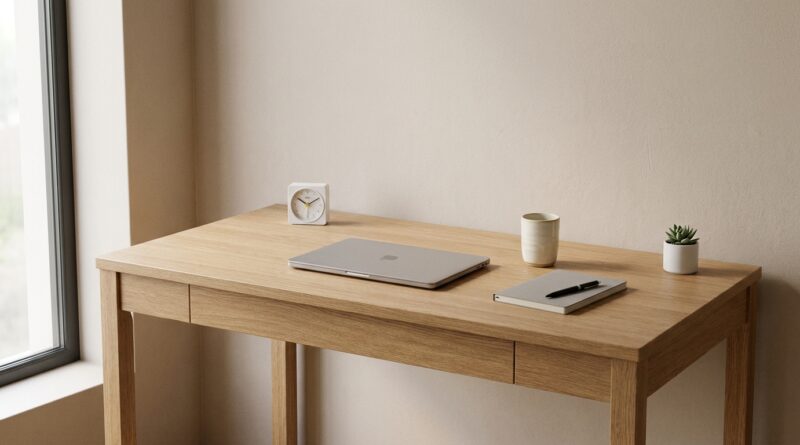
The 5‑Object Desk: A Minimalist Setup That Quietly Makes You Twice As Productive
You know the feeling. You sit down to work, glance at your desk, and somehow your attention is already gone. There is a charging cable you forgot to put away. A notebook from three ideas ago. Headphones, receipts, a water bottle, sticky notes, maybe a gadget you swore would make you more focused. Before your laptop even wakes up, your brain is busy sorting the mess. That is the hidden problem. A cluttered desk does not just look untidy. It keeps asking your brain tiny questions all day long.
A minimalist desk setup for productivity is not about making your workspace look like a showroom. It is about removing decisions, visual noise, and low-grade distraction. One simple rule helps more than most fancy systems. Keep only five objects on your desk. Not five categories. Five actual things. When your desk becomes quieter, your mind usually follows. And yes, you can set this up tonight.
⚡ In a Hurry? Key Takeaways
- A minimalist desk setup for productivity works best when you limit the desktop to five objects you truly use during focused work.
- Start with your laptop, a light source, water, one note tool, and one comfort item. Remove everything else for a week-long test.
- You do not need to throw things away. Just move non-essential items off the desk so your attention is not pulled in ten directions.
Why your desk drains focus before you even begin
Most people blame their phone, notifications, or their packed calendar. Fair enough. Those things matter. But physical clutter is sneakier because it feels harmless.
Your eyes land on every object in front of you. Your brain does a quick check on each one. Deal with this? Ignore it? Remember it? Put it away later? That background processing costs energy.
It is the same reason a hotel desk often feels easier to work at than your desk at home. There is less to process.
If this sounds familiar, pair this idea with The 5‑Pillar Input Day: A Minimalist Way To Stop Letting Random Stuff Hijack Your Brain. That piece tackles digital and mental input. This one starts with the physical space your brain sees first.
The 5-object rule
The rule is simple. During work, only five objects belong on the desk.
That count should include the things that are truly helping you do the task in front of you. Everything else gets moved to a drawer, shelf, side table, or box nearby.
This is not a design contest. It is friction reduction.
What counts as an object?
Count actual physical items. A laptop is one object. A monitor is one object. A notebook is one object. A pen is one object.
If you want to be a little flexible, you can treat a notebook and pen as one working pair. Just do not use that loophole to keep nineteen things on the desk and call it minimalism.
The five objects I recommend for most people
There is no perfect list for everyone, but this is a strong starting point for a minimalist desk setup for productivity.
1. Your main work device
This is usually a laptop or laptop plus monitor if your job truly needs it.
If you can work comfortably on just the laptop for a few days, try it. A second screen is useful for some people, but for others it becomes another place for distraction to live.
2. One note-capture tool
Pick a notebook and pen, or a small whiteboard, or a single legal pad. One only.
This gives your mind a trusted place to park ideas without covering the desk in sticky notes.
3. Water or coffee
Yes, your drink counts. If you are constantly getting up or feeling slightly dehydrated, your attention pays for it.
Use one bottle or one mug. Not a graveyard of both.
4. A focused light source
A desk lamp sounds boring until you work in bad lighting for a week. Good light reduces eye strain and subtly tells your brain, “this is the work zone.”
If your room already has excellent lighting, this slot can go to something else essential.
5. One comfort or grounding item
This is the personal object that keeps the setup from feeling cold. A plant. A photo. A small timer. One thing.
The point is not decoration for decoration’s sake. It is to make the desk feel calm and intentional, not sterile.
What should not live on the desk
Here is where most setups go sideways. People keep useful things within arm’s reach “just in case.” But “just in case” is how desks turn into storage units.
Move these off the desktop
Chargers you are not using right now.
Extra notebooks.
Mail.
Receipts.
Packaging.
Old coffee cups.
Random tech accessories.
Stacks of papers from unrelated projects.
Your phone, unless you need it for work in that specific session.
The goal is not to own less by tonight. The goal is to see less while you work tomorrow.
How to set this up tonight in 15 minutes
Step 1: Clear the whole desk
Take everything off. Everything. Wipe the surface.
That reset matters more than people think. It breaks the habit of negotiating with clutter piece by piece.
Step 2: Put back only your five
Choose the five objects that support your most important work tomorrow morning.
If you hesitate on an item, that is a clue it probably does not belong.
Step 3: Create a nearby “not on desk” zone
Use a drawer, basket, shelf, or even a box. This is where the maybe-useful stuff goes.
You are not banning it from your life. You are just telling it to stop sitting in front of your face all day.
Step 4: Test it for one week
Do not judge the setup after one hour. Give it a few work sessions.
You will notice two things fast. First, the desk feels strangely spacious. Second, you start work quicker because there is less visual chatter.
Common objections, answered
“But I use a lot of tools.”
You probably use a lot of tools across the whole day. That is different from using them all at once.
Think in work modes. Writing mode may need a laptop, notebook, water, lamp, and timer. Admin mode may need different five objects. Swap by session, not by impulse.
“Won’t this make my desk too plain?”
Maybe at first. We are used to desks looking busy. Busy can feel productive, even when it is not.
After a day or two, plain starts feeling peaceful.
“I work from home and my desk has to do everything.”
That is exactly why this helps. If one surface is doing office work, life admin, and storage, your brain never gets a clean signal.
A five-object desk creates a clear “now we are working” state without buying anything new.
Small upgrades that help without adding clutter
Use cable management out of sight
You do not need a fancy system. A couple of cable clips or Velcro ties can stop wires from becoming visual spaghetti.
Pick one tray off the desk
If papers keep creeping back, use a single inbox tray on a nearby shelf instead of the desktop itself.
Give your phone a parking spot elsewhere
Even a phone facedown still pulls at your attention. Put it behind you, on a windowsill, or across the room if possible.
What changes after a week
Do not expect magic. Expect less friction.
You will likely start work faster. You will fidget less with objects around you. You will feel less of that odd mental static that shows up before you even open the first file.
That is the real win. Not a prettier desk. A quieter start.
At a Glance: Comparison
| Feature/Aspect | Details | Verdict |
|---|---|---|
| Traditional cluttered desk | Many visible items, mixed projects, more visual noise, slower start to focused work. | Familiar, but mentally expensive. |
| 5-object minimalist desk setup | Only the essentials stay in view, fewer decisions, cleaner work signal for the brain. | Best choice for most people who want easier focus. |
| Over-designed “perfect” setup | Looks great online, but can become another project full of gear and tweaking. | Nice if you enjoy setup culture. Not required for productivity. |
Conclusion
A lot of people are drowning in digital distraction and constant input, but the desk itself is often the first thing hijacking attention every morning. That is why a minimalist desk setup for productivity works so well. It does not ask you to download another app, build a color-coded system, or become a different person. It simply removes visual noise and gives your brain a calmer place to begin. Try the five-object rule tonight. Snap a photo. Adjust your five after a day or two. By tomorrow morning, your desk can feel less like a dumping ground and more like a quiet command center built for real work.