The 5‑Item Workspace Reset: How a Bare Desk Can Double Your Focus in 7 Days
You are not lazy, broken, or bad at focus. You are probably just sitting down in a space that keeps poking your brain every few seconds. A pile of papers. Three charging cables. Ten browser tabs. A half-finished notebook. A phone lighting up like a slot machine. Then you wonder why your mind feels scattered before you even start. That is the trap. Many people keep changing apps, planners, and to-do systems when the real problem is much simpler. Their workspace is too loud. A bare desk will not magically turn you into a productivity machine, but it can remove dozens of tiny decisions that wear you down. That is the point of the five-item workspace reset. For one week, you strip your work zone down to only five things you truly need. Less visual noise. Less friction. More room for your brain to lock onto one task at a time.
⚡ In a Hurry? Key Takeaways
- A minimalist workspace productivity reset works by cutting visual clutter and decision fatigue, not by forcing more self-control.
- For seven days, keep only five essential items in your workspace and match that with a cleaner desktop and fewer open tabs.
- This is not about making your desk look fancy. It is about creating a calmer, repeatable focus zone that feels easier to return to every day.
Why your desk is draining your attention
Most clutter is not just stuff. It is unfinished business sitting in your line of sight.
Your brain sees a receipt and thinks, “I should file that.” It sees a gadget box and thinks, “I still need to set that up.” It sees a second notebook and wonders which one you are supposed to use. None of this feels huge on its own. Together, it acts like background noise all day.
That is why minimalist workspace productivity matters. You are not trying to create an empty showroom. You are trying to make your next action obvious.
What the 5-item workspace reset actually is
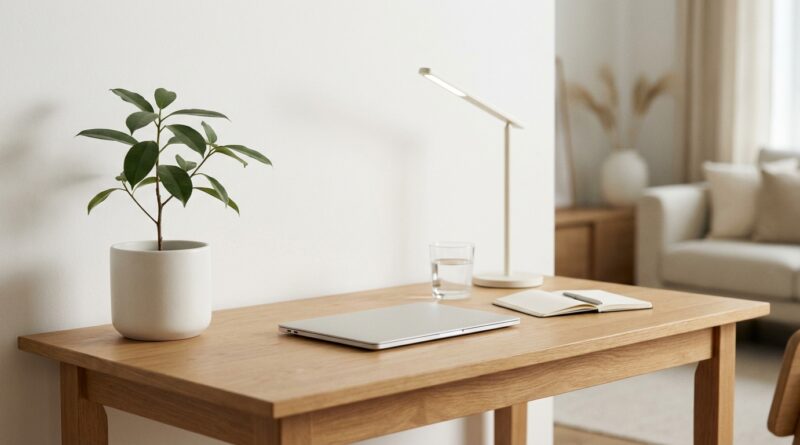
For the next seven days, your desk should hold only five work items. Not five categories. Five actual things.
A simple version looks like this:
The core five
- Your computer
- One notebook or pad
- One pen
- A water bottle or mug
- One task-related item, like headphones or a reference document
That is it. Everything else gets moved off the desk, into a drawer, onto a shelf, or into another room.
If you need a lamp because your room is dim, count it separately as part of the furniture setup, not your rotating work items. The same goes for your chair, monitor stand, or keyboard if they are fixed parts of the station.
Why this works better than another app
Apps organize tasks. They do not stop your eyes from bouncing around the room.
When your workspace is busy, your attention is forced into constant micro-choices. Should I answer that message? Move that cable? Read that sticky note? Grab the other notebook? Clean up later? Those choices cost mental energy.
A bare desk lowers the number of decisions between “I should start” and “I am working.” That gap is where focus often dies.
How to do the 7-day reset
Day 1: Remove everything
Clear the whole desk. Yes, all of it.
Wipe the surface. Start fresh. Then place back only your five essentials. If an item does not help you do today’s actual work, it does not return.
Day 2: Clean up your digital desk too
Your physical desk and your screen should match.
That means:
- Delete random files from the desktop
- Close browser tabs you are “saving for later”
- Turn off non-essential notifications
- Pin only the apps you use daily
If your monitor looks like a junk drawer, a clean desk can only help so much.
Day 3: Create one landing spot for everything else
The biggest reason people give up on a clean desk is that removed items have nowhere to go.
Use one tray, one drawer, or one box nearby for non-essential stuff. This becomes your holding zone. You are not throwing your life away. You are just taking it out of your face.
Day 4: Notice what you keep reaching for
This day is important. If you keep standing up to grab the same item, your first list may be wrong.
The five-item rule is not rigid for the sake of it. It is meant to reveal what is truly essential. Swap with intention, not out of habit.
Day 5: Cut duplicate tools
Most people have too many versions of the same thing. Two planners. Three note apps. Multiple charging cables. A stack of pens, yet only one works.
Pick one. Focus gets easier when your tools stop competing with each other.
Day 6: Build a start-of-work ritual
This can be very small. Fill water. Open one document. Put phone out of reach. Write the first task on paper.
When the desk is simple, rituals stand out more. That helps train your brain to switch into work mode faster.
Day 7: Review what changed
Ask yourself three questions:
- Did I start work faster?
- Did I feel less anxious sitting down?
- What items never needed to come back?
You may be surprised how much “necessary” stuff turns out to be decoration, delay, or guilt.
The easiest five-item setups for different kinds of work
If you work on a laptop all day
- Laptop
- Notebook
- Pen
- Water bottle
- Headphones
If you do lots of reading or paperwork
- Computer
- Current document only
- Notebook
- Pen
- Water bottle
If you are a student
- Laptop
- One class notebook
- Pen
- Textbook or reading material
- Water bottle
The goal is not perfection. The goal is fewer attention traps.
What to remove first if you feel overwhelmed
If your desk is a mess right now, do not overthink it. Start with the biggest focus thieves:
- Old cups and bottles
- Loose papers you are not using today
- Extra notebooks
- Unused tech accessories
- Your phone, if possible
That last one matters a lot. If your phone stays on the desk, it becomes a tiny emergency beacon. Even face-down, it pulls at your attention.
Common mistakes people make with a minimalist workspace
Mistake 1: Treating it like decor
A neat desk that still leaves you hunting for what you need is not helpful. Function comes first.
Mistake 2: Hiding clutter instead of deciding on it
Stuffing everything into random drawers works for a day. Then the mess returns. Give extra items a real home.
Mistake 3: Keeping “just in case” items in sight
If you use something once a month, it should not live on the desk every day.
Mistake 4: Ignoring digital clutter
A clean desk paired with 27 tabs, nonstop pings, and a messy desktop is like washing one side of your car.
What kind of results should you expect?
“Double your focus” is a catchy promise, but the real gains are often more human than dramatic.
You may notice that you begin work with less resistance. You stop fidgeting with objects around you. Your shoulders drop a little. You can find your notebook instantly. You spend more time doing the task and less time preparing to do the task.
That is real progress.
Some people also notice reduced anxiety because the desk stops reminding them of every unfinished thing in their life. That feeling alone can make work sessions longer and smoother.
If you share a space or cannot keep a desk permanently bare
You can still use the reset.
Think in terms of a “focus kit.” Keep your five work items in a tote, drawer, or portable caddy. When it is time to work, place those five items out. When you are done, pack them away.
It is the same principle. A clear signal to your brain that this is now a work zone.
At a Glance: Comparison
| Feature/Aspect | Details | Verdict |
|---|---|---|
| Traditional busy desk | Multiple tools, papers, gadgets, and visual reminders competing for your attention | Feels prepared, but often slows focus |
| 5-item workspace reset | Only the items needed for the task in front of you stay visible | Best for faster starts and calmer work sessions |
| Digital cleanup | Fewer tabs, fewer notifications, cleaner desktop, simpler app choices | Essential if you want the physical reset to stick |
Conclusion
Right now, a lot of people are quietly learning that productivity is not only about discipline. It is also about environment. If your workspace keeps asking for attention, your brain will keep answering. A streamlined five-item setup is a fast, practical way to cut decision fatigue, ease anxiety, and make focus feel less like a fight. You do not need a new app. You do not need a color-coded life plan. You just need a workspace that stops interrupting you. Try it for seven days. Your desk may not look exciting, but your brain will probably feel a lot better sitting down to it.